
Neutron Music Player
Neutron Code LimitedMusic & Audio
3.82.01K Reviews
- Version
- 2.28.3
- Installs
- 100.00K
- Age Rating
- Everyone
Screenshots

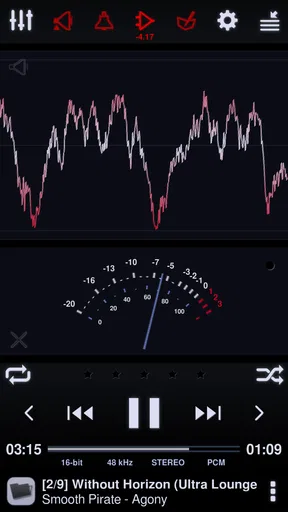
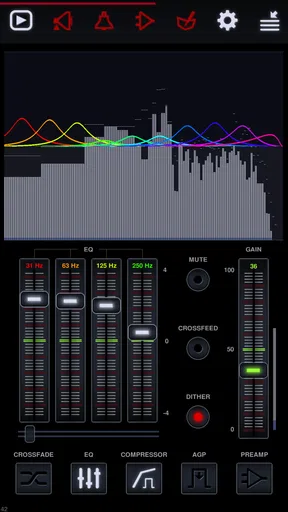
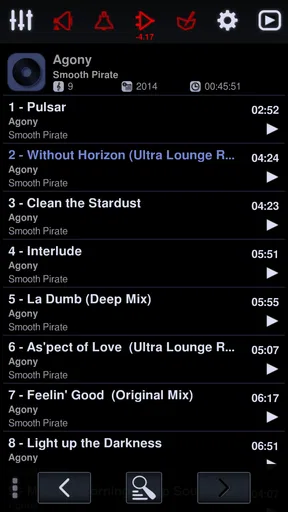
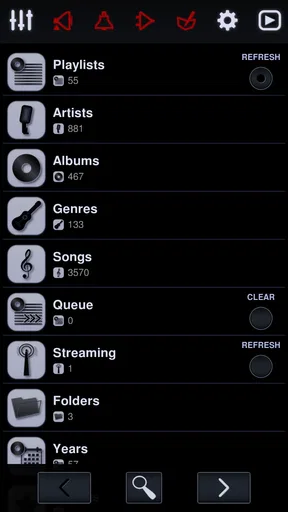
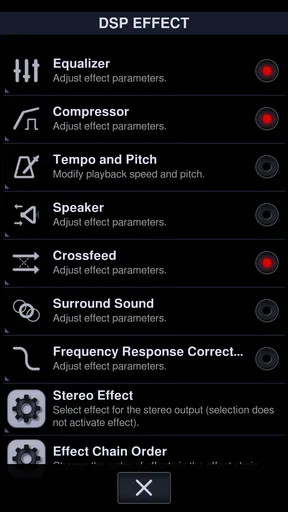
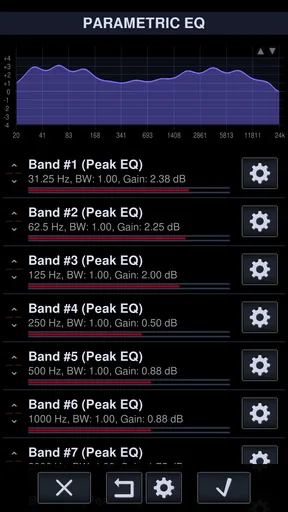
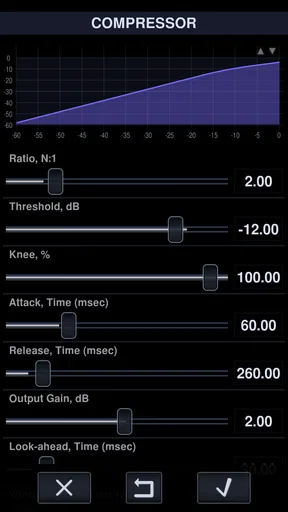
Our Review of Neutron Music Player
 Analysis by Appyee
I tend to think about a music player differently when it’s used around the house rather than by one person with headphones. Someone may want a carefully tuned album in the living room, while another person simply wants to play a familiar playlist without touching a maze of sound settings. That contrast is where Neutron Music Player makes the most sense: it gives a committed listener room to shape playback, but it asks each user to be comfortable with a fairly hands-on tool.
One player, different listening habits
In a shared household, the practical question is not only whether a player can sound good. It is whether the person who set it up can leave it in a state that other people can use without accidentally changing the experience. Neutron’s depth is useful for the person who enjoys adjusting audio, but it can make casual listening feel less immediate. I would treat it as a dedicated player for a shared music library or a particular listening setup, not automatically as the simplest choice for every person using the same device.
A realistic example: I might spend a quiet evening refining playback for speakers, then hand the phone to someone who just wants to put on music while making dinner. The thoughtful move is to finish the adjustments first and agree on a simple routine for starting playback. If the other listener is likely to explore menus or alter settings, a more straightforward player may be a better fit for that moment. That is not a flaw in sound quality; it is a trade-off between control and ease.
Keep setup choices deliberate
Neutron Music Player is made by Neutron Code Limited, and its identity is clearly centered on playback control rather than a polished, minimal interface. I would take a little time to learn the layout before relying on it as the household’s everyday player. Change one setting at a time, listen to a familiar track, and keep note of what you changed. That simple approach makes it easier to tell whether an adjustment actually helps or merely makes the sound different.
One useful habit is to think in terms of a listening chain: the track, the device output, and any connected audio equipment all affect what you hear. If music sounds unexpectedly different after connecting another setup, check the playback route before repeatedly adjusting the equalizer. Otherwise, you may compensate for a difference in equipment with settings that do not suit your usual headphones or speakers. This is especially relevant when one person uses the phone directly and another connects it to a home audio system.
The app’s extensive controls reward curiosity, but they are not a requirement for enjoying every track. I would begin with a neutral, familiar listening baseline and only reach for detailed adjustments when there is a clear reason, such as making a particular pair of headphones more comfortable. If you are setting it up for someone else, explain which changes are intentional and which controls they can safely ignore. That prevents a shared device from turning into a guessing game.
Coordination without making it a project
There is a small but real coordination cost whenever several people share one player: preferences differ, and what sounds balanced to one listener may not suit another. A person who likes prominent bass might adjust playback in a way that another listener finds tiring. Rather than trying to create one perfect sound for everyone, I’d agree on a sensible everyday setup and let the person who wants more control make deliberate changes when they are listening alone.
That approach also helps with connected equipment. If someone is about to use a USB DAC or a home system, it is worth saying so before playback starts, especially if another listener expects sound from the phone itself. Neutron supports these kinds of setups, but the benefit depends on the rest of the listening chain and on users knowing what is connected. For a household that mainly presses play through one familiar route, a simpler app may demand less coordination.
Neutron is also not a substitute for a shared streaming service or a family music library. I see it as a playback-focused app for listening to music you can access, rather than a social hub for coordinating tastes, profiles, or household queues. If the main need is for different people to keep separate recommendations and listening histories, a service built around individual accounts will usually be the more natural choice. If the priority is shaping playback through a particular audio setup, Neutron has a more compelling reason to be on the device.
Age, trust, and a sensible household fit
The content rating is Everyone, which makes the app suitable for a broad age context, but that does not mean every setting is equally easy for every user to manage. I would judge suitability by whether the person using it can navigate the controls and understand that playback adjustments affect what they hear. For a younger or less technically confident listener, an adult can configure the basics first and keep the day-to-day routine simple.
There is also a distinction between sharing a device and sharing an account. Neutron is a music player, not a family-account manager, so I would not choose it to solve household access or privacy boundaries. If separate profiles, personalized recommendations, or coordinated listening history matter, look for those features in a service designed around accounts. If everyone simply needs a capable player for music on one device, the decision is more about interface comfort and audio preferences.
Who benefits from its depth—and who may not
I would recommend it most to listeners who already know what they want from playback, enjoy exploring a parametric equalizer, or use equipment such as a USB DAC and want more control than a basic built-in player offers. It can also suit someone with a varied personal library who values details such as gapless album playback. The appeal is not that every listener must tune every track; it is that the tools are there when a listener has a specific goal.
On the other hand, if you mainly use a streaming service, want recommendations and playlists to be the center of the experience, or dislike navigating detailed settings, your usual music app may be a better daily companion. Neutron’s learning curve is a genuine cost, particularly on a shared phone where not everyone wants to learn the same interface. I would not pay for its specialist approach just because “better audio” sounds appealing; it makes more sense when you can name the control or listening setup you actually want.
That judgment matters because this is a paid app at $12.99, not a casual free download. Its average rating is 3.8 from around 21,000 ratings, with roughly 2,000 written reviews, and it has over 100,000 installs. Those figures suggest a substantial audience, but they do not tell me whether it will suit a particular household. I’d weigh the purchase against how often you listen to locally available music and whether its extra control solves a real problem for you.
First Impressions: Is it Worth the Hype?
When I first opened the Neutron Music Player, I was greeted by its somewhat retro-looking interface. It’s not the flashiest out there, but don’t let that fool you. This app is like that understated friend who surprises you with mind-blowing talents. The design focuses on functionality over fancy graphics, which might actually be a refreshing change for those who are tired of style over substance.
Once you dig in, you’ll notice the sheer power under the hood. This app is all about audio quality. It’s like having a pro-grade audio player right in your pocket. The sound customization options are extensive, and I mean extensive. If you’re someone who loves tweaking every little detail, you’re going to have a field day.
Diving Into the Features: What Makes It Special?
Okay, let’s get into the nitty-gritty. The Neutron Music Player is all about offering high-resolution audio. It supports almost every audio format you can think of, like FLAC, MP3, and even DSD. This is a big win if you’re an audiophile looking to get the most out of your music library.
There’s a 32/64-bit audio rendering engine here, which is fancy talk for saying it can process audio with precision and clarity. There’s also a parametric equalizer that lets you control each frequency band. That means you can tweak the sound to match your exact preferences. It’s like having a mixing board right on your phone.
Another cool feature is the support for network streaming and USB DACs. If you’ve got a fancy sound setup at home, you can easily integrate it with Neutron. The app also supports gapless playback, which is a must-have for enjoying albums the way they were meant to be heard.
User Experience: The Good and the Not-So-Good
Now, let’s talk about how it feels to use the app. It’s clear that Neutron Music Player is built for those who are serious about their sound. But, and this is a big but, there’s a learning curve. If you’re used to simpler interfaces, you might find yourself scratching your head a bit. However, once you get the hang of it, the possibilities are pretty exciting.
The setup options are rich. You can customize everything from the interface layout to the way your music is sorted. It’s like a playground for music enthusiasts. But, if you’re someone who just wants to hit play and go, this might feel a bit overwhelming.
On the upside, the app is quite stable. I didn’t experience any crashes or weird bugs during my time with it, which is always a plus. The developers seem to be on top of updates, continuously improving the app’s performance and compatibility.
The Final Note: Is Neutron Music Player for You?
In conclusion, if you’re an audiophile or someone who loves to have complete control over your music listening experience, Neutron Music Player is definitely worth a look. It’s not the most user-friendly app right out of the box, but for those willing to dive in, it offers a level of audio customization that’s hard to beat.
However, if you’re someone who prefers a more straightforward, plug-and-play experience, you might find the complexities a bit too much. But hey, if you’re curious about what it can offer, I say give it a try. You might just find yourself converted to the world of high-fidelity audio.
Whether you’re streaming your favorite albums or exploring new genres, Neutron Music Player aims to make your music sound its best. And honestly, that’s what it’s all about, right? Happy listening!
Practical listening and version context
For a commute or a short walk, I’d set up a familiar album or playlist before leaving rather than try to learn the interface on the move. The app’s detailed controls are most useful when I can listen closely and compare changes, not when I am distracted or sharing the phone with someone who only wants music to start quickly. A good test is to use one well-known track at a comfortable volume, make a single adjustment, and decide whether the change is genuinely better over several songs.
That kind of comparison is more reliable than changing several equalizer bands at once. If I alter multiple frequencies and switch audio equipment at the same time, it becomes hard to know what caused the difference. For someone exploring the parametric equalizer, a gradual workflow keeps the result understandable and easy to reverse. It also helps avoid overcorrecting a track that was already mixed the way I like it.
The current version is 2.28.3, and the app has been available since June 7, 2011. It supports Android devices running version 2.3 or later, making its platform history unusually long. I would still check that the device and connected audio gear suit the way I plan to listen, rather than assuming an older minimum operating-system requirement means every modern accessory will behave identically. The core decision is whether its playback controls match my needs, not simply whether it installs.
Choosing between a specialist player and an everyday app
Compared with the usual music apps, Neutron puts more emphasis on the playback path and sound shaping than on discovery, social features, or a streamlined home screen. That makes it a different kind of choice from a subscription service that leads with curated mixes and recommendations. If I want a new album suggested for the drive, I would reach for the service that already knows my listening habits. If I want to play a known album and control how it comes through my equipment, Neutron is more relevant.
It also differs from a basic phone music player. A default player is often easier for quick playback, and that simplicity can be more valuable than detailed audio options when I am cooking, exercising, or passing a phone to another person. Neutron earns its place when the settings are part of the experience rather than obstacles between me and a song. There is no universal winner here: the right choice depends on whether convenience or hands-on playback matters more on that device.
My household verdict
For a household with one person who cares deeply about sound and other listeners who prefer simple controls, I would install Neutron only if that main listener is willing to handle the setup and explain the basics. It can serve a focused listening role without requiring everyone to become an audio enthusiast. But if the shared device needs to be effortless for all ages and tastes, a simpler player—or a music service with individual profiles—will probably create less friction.
Overall, I see Neutron Music Player as a capable, specialist music app rather than a universal household default. Its Everyone age rating is reassuring for broad use, while the price and detailed interface make it a more considered purchase than a casual utility. I’d choose it for a listener who will actually use the equalizer, formats, gapless playback, or external audio setup; I’d skip it when the household’s main priorities are effortless sharing, personalized accounts, and instant recommendations.
Verdict
Strengths of Neutron Music Player
- High-quality audio playback support
- Extensive format compatibility
- Customizable equalizer settings
- Offline music access
- User-friendly interface
Limitations of Neutron Music Player
- No free version available
- Interface feels outdated
- Complex features for beginners
- Limited cloud service integration
- Battery consumption is high
Similar Picks in This Category
View All
YouTube Music
Google LLC4.4

Samsung Music
Samsung Electronics Co., Ltd.3.8

Spotify: Music and Podcasts
Spotify AB4.3

JioSaavn - Music & Podcasts
Saavn Media Limited4.3

Lark Player:Music Player & MP3
Lark Player Studio - Music, MP3 & Video Player4.6

StarMaker: Sing Karaoke Songs
SKYWORK AI PTE. LTD.4.3
Frequently Asked Questions
What platforms is Neutron Music Player available on?
Neutron Music Player is available for both Android and iOS platforms. It offers a high-quality audio experience on smartphones and tablets. Before downloading, ensure your device meets the minimum OS requirements specified on the respective app store pages.
Does Neutron Music Player support high-resolution audio formats?
Yes, Neutron Music Player supports a wide range of high-resolution audio formats, including FLAC, ALAC, and DSD. This makes it an excellent choice for audiophiles who want to enjoy music in the highest possible quality on their mobile devices.
What are the customization options available in Neutron Music Player?
Neutron Music Player offers extensive customization options, allowing users to tweak the audio output with a 32/64-bit audio rendering engine, multiple equalizer bands, and crossfeed settings. Users can also customize the UI layout to suit their preferences, enhancing both functionality and aesthetics.
Is Neutron Music Player suitable for casual listeners?
While Neutron Music Player is designed with audiophiles in mind, casual listeners can also enjoy its benefits. However, its advanced settings might be overwhelming for those looking for a simple music player. It's ideal for users who want to explore and adjust audio settings for a tailored listening experience.
Does Neutron Music Player require an internet connection to work?
No, Neutron Music Player does not require an internet connection to play your local music files. However, if you wish to stream music from cloud services or download album art, an internet connection will be necessary. The app is fully functional offline for local playback.
